Unlocking Digital Privacy with Virtual Private Network (VPN)
What is a VPN?
Table of Contents
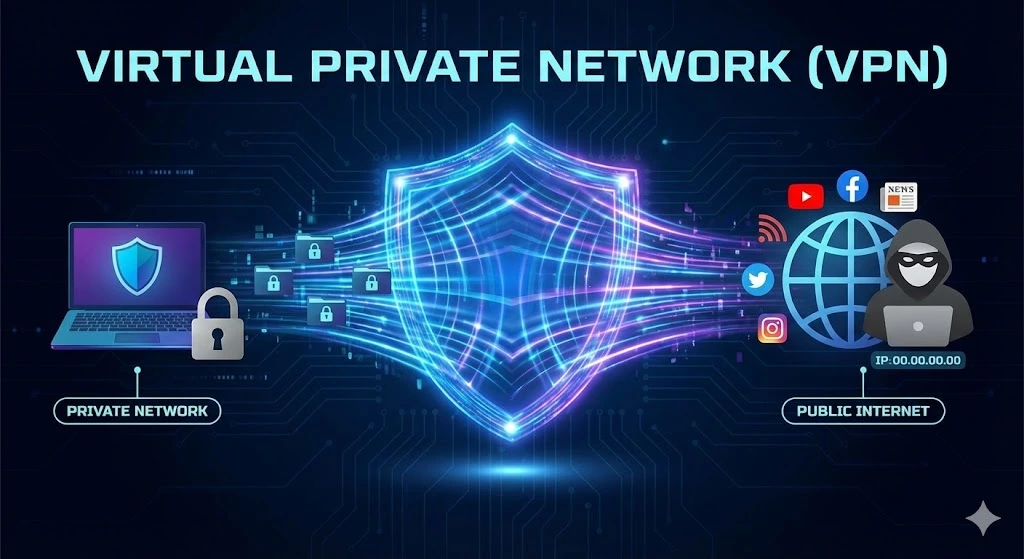
ToggleA Virtual Private Network (VPN) is a technology that allows users to create a secure connection to another network over the Internet. By encrypting your data, a VPN hides your online activities, making it harder for hackers, advertisers, or even your ISP to track your browsing behavior. Essentially, a VPN acts as a tunnel, shielding your Internet traffic from prying eyes and ensuring privacy and security when browsing, streaming, or even working remotely.
VPNs are commonly used for bypassing geo-restricted websites, securing data transfers, or simply adding an extra layer of protection on public Wi-Fi networks.
How Does a VPN Work?
A virtual private network works by creating an encrypted tunnel between your device (like a computer or smartphone) and a remote server operated by the VPN provider. When you connect to a VPN, your Internet traffic is routed through this secure tunnel, meaning any data that travels between you and the Internet is hidden from prying eyes, such as hackers, government agencies, or your Internet Service Provider (ISP).
Here’s how it works step by step:
1. Device Encryption: When you access the internet, the VPN encrypts your data at the source (your device). Encryption protocols like AES-256 transform your information into unreadable code.
2. Tunnel Through a Remote Server: Instead of your data being sent directly to the Internet, it’s rerouted through a server run by the VPN provider. This server could be located anywhere in the world.
3. Data Decryption: When the VPN server receives the encrypted data, it decrypts it and forwards your request to the destination (website, online service, etc.). The process then happens in reverse as the VPN server encrypts the response before sending it back to you.
The encryption process ensures that sensitive information (e.g., login credentials, payment details) is kept secure, and since your IP address is masked by the VPN, your online activity appears as though it’s coming from a different location, improving your privacy.
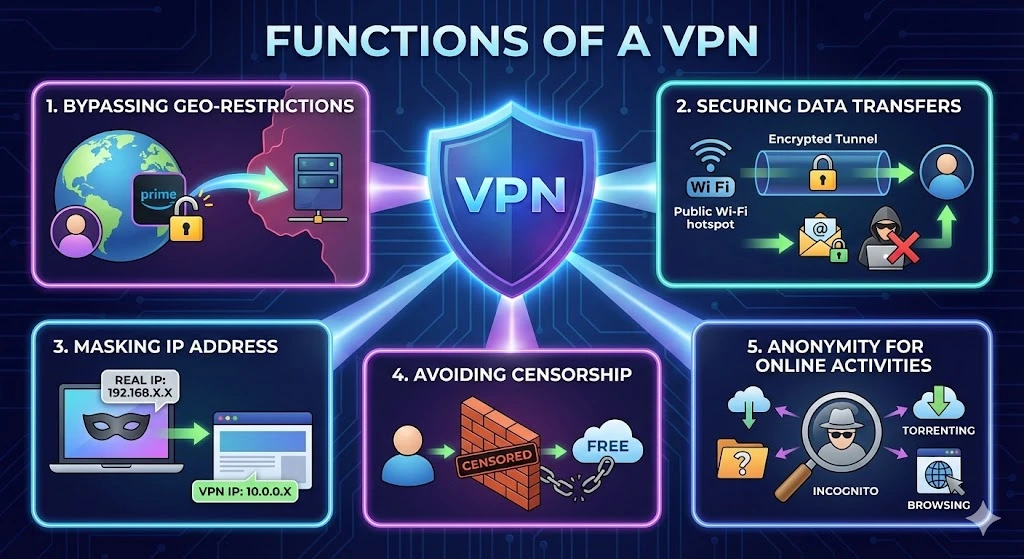
Functions of a VPN
1. Bypassing Geo-Restrictions:
VPNs are often used to access content that is regionally restricted, such as streaming services, websites, or apps. For example, if you’re in a country where certain websites are blocked, a VPN can make it appear as if you’re browsing from a different region where access is unrestricted.
2. Securing Data Transfers:
Businesses and individuals use VPNs to protect sensitive information, especially when using public Wi-Fi networks. Public Wi-Fi is notorious for its lack of security, making your data vulnerable to cyberattacks. By encrypting your traffic, a VPN ensures that even if hackers intercept your data, it will be unreadable.
3. Masking IP Address:
A VPN hides your true IP address, which is a unique identifier assigned to your device. This helps protect your identity and location from websites, advertisers, and cybercriminals who might track your online activities.
4. Avoiding Censorship:
In countries with heavy internet censorship, VPNs can be essential tools for accessing the free and open web. Activists, journalists, and citizens use VPNs to circumvent government restrictions and communicate freely online.
5. Anonymity for Online Activities:
VPNs provide anonymity when browsing the internet, preventing third parties from monitoring your online activities. This is especially important for people concerned about privacy or engaging in activities like torrenting, where anonymity is crucial.
What to Look for in a Good VPN Service Provider
When choosing a VPN service, it’s essential to know what features and factors make a service stand out. Here are the key things to consider:
1. Strong Encryption and Security Features
A good VPN must offer robust encryption protocols such as AES-256 to ensure that your data remains secure. Features like a kill switch (which cuts your Internet connection if the VPN fails) and DNS leak protection are vital for ensuring total privacy.
2. No-Logs Policy
Look for a provider with a strict no-logs policy, meaning they don’t store or track your activity online. This guarantees your data and browsing history remain private, even from the VPN provider.
3. Fast Connection Speeds
While VPNs route your traffic through different servers, they can sometimes slow down your connection. Opt for a service that offers high-speed servers, especially if you’re into streaming, gaming, or using bandwidth-intensive services.
4. Global Server Coverage
The more servers a VPN provider has around the world, the better. A wide range of servers gives you more options for bypassing geo-restrictions and finding the fastest connection.
5. Ease of Use
User-friendly interfaces with one-click connections make VPNs easier for beginners. Look for apps that work across multiple devices and platforms, such as Windows, macOS, Android, and iOS.
6. Multiple Device Support
If you’re looking to protect multiple devices simultaneously (laptops, smartphones, etc.), ensure the VPN allows multiple connections under one subscription. Many providers allow 5 or more devices to be connected at once.
7. Price and Payment Plans
While free VPNs may be tempting, they often lack advanced features or security, and some may even sell your data. Opt for a premium service that offers flexible subscription plans, and ensure they accept secure payment methods like PayPal or cryptocurrency for added anonymity.
Finding the Right VPN for You
VPN is essential for anyone looking to enhance online privacy, bypass censorship, or secure data. With a variety of VPN providers in the market, it’s important to look for robust encryption, no-logs policies, fast connection speeds, and comprehensive global coverage. Popular VPN providers include NordVPN, ExpressVPN, CyberGhost, and Surfshark, each offering different features and pricing options to suit various user needs.
Trusted IPv4 Leasing for Business Growth
Get enterprise-grade IPv4 space quickly, with seamless deployment and end-to-end management.
FAQs
Yes, a VPN can slightly slow down your internet connection because your data has to travel through an extra server and undergo encryption. However, premium VPN services are optimized to minimize this lag. In some cases, a VPN can actually increase speeds if your Internet Service Provider (ISP) is deliberately throttling your bandwidth for streaming or gaming.
A Proxy mainly hides your IP address but does not encrypt your data, meaning your ISP can still see what you are doing. A VPN both hides your IP address and encrypts all your internet traffic, providing a much higher level of security and privacy compared to a simple proxy.
If you use a high-quality VPN with a strict “No-Logs Policy,” your activity cannot be tracked back to you because the VPN provider does not keep records of your browsing history. However, a VPN does not protect you if you voluntarily log into websites (like Google or Facebook) that track your activity while you are signed in.
Generally, no. Running a VPN network is expensive. If a service is free, they often monetize it by selling your data to advertisers, limiting your speed, or displaying invasive ads. For genuine privacy, a paid “No-Logs” VPN service is recommended over a free one.
Buying IPv4 addresses outside proper IP Allocation channels exposes organisations to fraud, legal disputes, operational failures and long-term governance risks.Key Read more
Facing IPv4 shortages, companies must weigh cost, speed, and network growth when choosing a lease plan.Short-term leasing lets you scale Read more
IPv4 地址曾经只是互联网运行所需的基础资源。但在今天,它越来越像一种具有市场价格、可交易、可租赁的数字资产。造成这一变化的原因并不复杂:IPv4 的总量有限,而全球互联网对 IPv4 的需求并没有消失;与此同时,IPv6 虽然早已出现,但迁移进度依然缓慢。这三股力量叠加,正在重新塑造运营商对 IP 地址的看法,也改变了互联网基础设施的经济逻辑。原文将这点概括为“有限供给、持续需求与缓慢转型”,并指出这正在推动 IP 地址成为影响全球电信经济的可交易资产。 IPv4 稀缺并不是新问题 全球互联网至今仍大量依赖 IPv4。这个协议诞生于更早的时代,只能提供大约 43 亿个地址。这个数量在互联网初期似乎足够庞大,但在今天已经明显不够。原文指出,IANA 在 2011 年就已将最后一批大型 IPv4 Read more